Property Definitions
The items property is an array of item objects with the following required properties:
sku: Unique ID for this individual item.
quantity: Number of duplicate items.
dimension1, dimension2, and dimension3: Length, width, and height of an item. Because items can be rotated in any orientation, the names length, width (or depth), and height are irrelevant to the algorithm.
Additionally, PackNet Cube accepts the following optional properties:
weight: A value of zero indicates that no weight information is provided.
canNest: A feature to stack items together. If the quantity is greater than 1, all items can be nested together (e.g., plates, cups, chairs, bookends).
nestGrowthDimension1, nestGrowthDimension2, nestGrowthDimension3: Required dimensions indicating how groups of items grow in size as multiple items are stacked together.
nestMaxDimension1, nestMaxDimension2, nestMaxDimension3: Used to indicate the maximum dimension to stack/nest.
canContain: A feature enabling smaller products to be placed inside larger cavities of other products (e.g., a garbage can, storage container, or large bowl). Each of these items has usable space that can reduce the final size of the carton.
containDimension1, containDimension2, containDimension3: Dimensions of the cavity.
Orientation: Allows the user to specify how a product sits as it is placed into a carton. When the orientation of a product is locked, cartonization software must make sure that all packaging solutions will accommodate the product in the specified direction.
Padding: Adds an amount of padding to go around the product.
Layering: Allows other products to be stacked above or below the product.
The selectionOptions property is used to guide the decisions that PackNet Cube makes while searching for optimal solutions. It dictates to PackNet Cube how to determine which solutions are more suitable or less suitable.
orderBy: Tells PackNet Cube how to sort the final set of solutions that are returned to the user, with the first solution being most suitable. This property is a string, and accepts the following values (case is important).
Note
This property is not supported by the SBP endpoint.
“none” – Return the solutions in whatever order they are found. Use this when not wanting to make any assumptions about the solutions returned. PackNet Cube always searches from the smallest carton size to the largest, incrementing along each of the three dimensions one at a time. Select this option when the step-size is large and the expected solution size is small.
“percent-filled” – Results will be sorted based on the percentage filled, in descending order based on this calculation (itemVolumePacked / containerVolume * 100). This ordering may result in selecting cartons that are awkwardly long (i.e., train-style) or awkwardly wide and flat (i.e., pizza box).
“distance” – Results will be sorted by cartons with the shortest distance to cartons with the longest. Distance for an individual carton is calculated by the square root of its (length2 + width2 + height2). Containers with a shorter distance will be more compact (i.e., cubic) than containers with a longer distance. This correlates directly to using less corrugate overall.
“volume” – Results are sorted by carton volume, from least to greatest. Sorting by volume yields similar results to sorting by percent filled.
“surfaceArea” – Results are sorted by surface area, from least to greatest. Sorting by surface area yields results that are similar to sorting by distance. Surface area is the strongest indicator of the amount of corrugate used; however, it does not account for the amount required for the actual carton design that you select (e.g., RSC style patterns use the least amount of corrugate overall compared to FOL style patterns and others).
cutoffTime: An integer value in milliseconds. If the request takes longer than this amount of time, all further processing for the job will be cancelled and PackNet Cube will return whatever results it managed to compute within that time. A value of 0 indicates no cutoff time, and PackNet Cube will take as long as it needs to search all possible carton sizes for the job. Use this property to set a cutoff time for jobs that take a long time to pack.
shrinkwrap: By default, RSBP will shrinkwrap. It can be disabled by passing 'false', but disabling this option is discouraged. Shrinkwrap uses the containers list created based on the containerOptions values and then trims any empty space between the packed items and the container's wall to form a snug fit. This allows for a slightly larger incrementBy value while still returning a box with less waste (saves processing time).
This property tells PackNet Cube how many solutions to return. Use any number less than 1 to indicate no limit.
This property is optional. If it is missing, or if its value is ≤0, then PackNet Cube will return all results.
Note
The result set for some requests can be extremely large (i.e., tens of megabytes). The recommended size is between 50 and 200. Requests for 2-5 items will only have about 20 unique suitable solutions. All other solutions will be variations of the initial set of optimal solutions, but with incrementally larger and larger carton sizes.
The set of optimal suitable solutions can vary greatly based on:
Total number of items.
Quantity of individual items.
Longest dimension of each item, or the ratio between the two longest dimensions.
Overall max carton dimensions.
The RSBP endpoint requires an additional property in the JSON request called containerOptions. This property has the following sub-properties:
minimumDimension1, minimumDimension2, minimumDimension3: The minimum carton dimensions allowable. This is often based on the conveyance system and the shipping label location.
maximumDimension1, maximumDimension2, maximumDimension3: The maximum carton dimensions allowable. Set these dimensions according to the limitations of the conveyance system and the dimensions of the Packsize machine(s) that are configured.
incrementDimension1By, incrementDimension2By, incrementDimension3By: These three step-sizes are used as increments when searching for optimal solutions.
maximumWeight: The maximum weight the container can hold (i.e., packed items).
A predefined list of containers used to pick from for cubing.
timeoutReached: Boolean - If true, it means that it calculated as many solutions as possible within the cutoff time, but still had more to try.
To prevent this from happening:
incrementDimensionXBy can be increased (suggested value is 1-2 when shrinkwrap is enabled)
minimumDimensionX can be increased if a larger box is expected
minimumDimensionX can be lowered if a smaller box is expected
cutoffTime can be increased (up to the internal maximum)
isPacked: Boolean - True when item was packed in this solution.
CoordinateX,Y,Z: The coordinates of the item within the box solution.
packedDimensionX,Y,Z: The packed dimensions of the item within the box solution.
voidContents: Information regarding the item's cavity's contents (if canContain is true and another item was packed in its cavity, it will show here).
nestedQuantity: If canNest is true and nesting/stacking was done for this solution, the number of nested items would be reflected here.
Shrinkwrap
By Default, RSBP will shrinkwrap the items into a snug box. This allows users to use an incrementBy value of 1 or 2 and still getting a good solution, but much faster than using 0.1.
To disable this feature, set shrinkwrap to false in the selectionOptions. Shrinkwrap is also available in the SBP model but is not enabled by default.
Nesting - stacking one or more of the same item inside of itself such as plastic cups or a stack of chairs. For example, cups or plates will have the same length and width, but when stacked there will be a base height for the first item plus an incremental height for each successive item. nestGrowthDimension# must relate to the item's dimension#.
Limitations for nesting depend on the largest box possible and the type of item that is being nested. It isn't feasible to nest 1 chairs because it would not fit in the largest box but also creates a cumbersome way of transporting the chairs. A user should be mindful of setting the number limit of items that can be nested.
canContain - denotes whether an item has space in which another, smaller item can be placed inside of the cavity. An example of this would be placing a hammer inside of a bucket.
Example 1 - Eight Buckets and Four Items
This example includes eight buckets and four random, same-sized items that cannot nest, stack, or contain. Based on the NestMaxDimension3, the stack size is limited to two buckets per stack, but the four bucket stacks can each contain one item as long as it fits the "contain" dimensions of the bucket.
Items sent to RSBP
{
            "dimension1": 6,
            "dimension2": 6,
            "dimension3": 10,
            "id": 1,
            "quantity": 8,
            "sku": "Bucket",
            "canNest":true,
            "NestGrowthDimension1":0,
            "NestGrowthDimension2":0,
            "NestGrowthDimension3":1,
            "NestMaxDimension1":0,
            "NestMaxDimension2":0,
            "NestMaxDimension3":11,
            "canContain": true,
            "containDimension1":4,
            "containDimension2":4,
            "containDimension3":8
        },
        {
            "dimension1": 3,
            "dimension2": 3,
            "dimension3": 7,
            "id": 1,
            "quantity": 4,
            "sku": "RandomTool"
        }
Result
            "dimension1": 11.0,
            "dimension2": 12.0,
"dimension3": 12.0,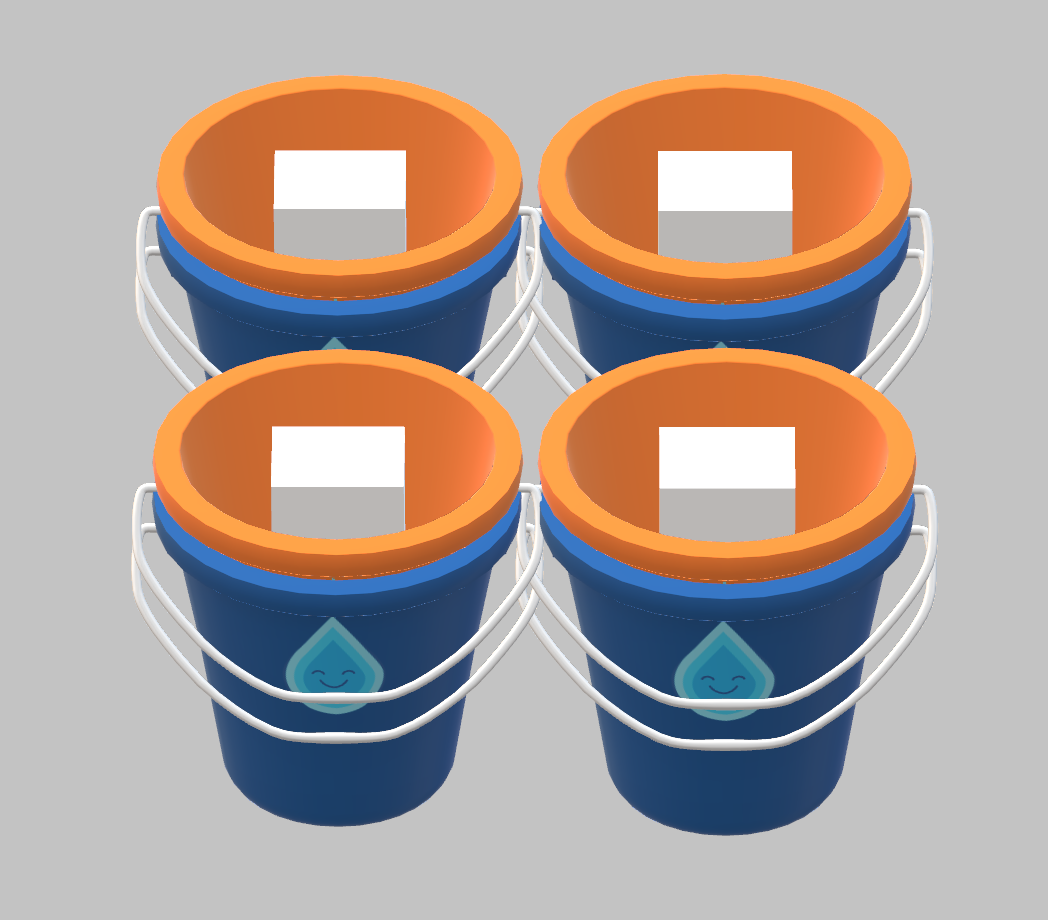 |
Example 2 - Five Buckets
In this example, five buckets having a growth of 1 unit/inch on the height dimension (NestMaxDimension3) of 11.
Items sent to RSBP
        {
            "dimension1": 6,
            "dimension2": 6,
            "dimension3": 10,
            "id": 1,
            "quantity": 5,
            "sku": "Real01",
            "canNest":true,
            "NestGrowthDimension1":0,
            "NestGrowthDimension2":0,
            "NestGrowthDimension3":1,
            "NestMaxDimension1":0,
            "NestMaxDimension2":0,
            "NestMaxDimension3":11
        }
Result
            "dimension1": 18.0,
            "dimension2": 11.0,
"dimension3": 6.0,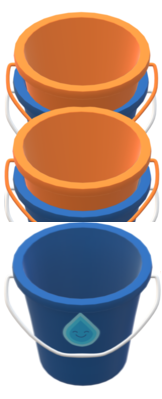 |
Example 3 - Three Buckets
Three buckets have a growth of 1 unit/inch on the height dimension (NestMaxDimension3) of 11 so each stack has a max of 2 buckets.
Sent to RSBP:
        {
            "dimension1": 6,
            "dimension2": 6,
            "dimension3": 10,
            "id": 1,
            "quantity": 3,
            "sku": "Real01",
            "canNest":true,
            "NestGrowthDimension1":0,
            "NestGrowthDimension2":0,
            "NestGrowthDimension3":1,
            "NestMaxDimension1":0,
            "NestMaxDimension2":0,
            "NestMaxDimension3":11
        }
Result:
            "dimension1": 12.0,
            "dimension2": 11.0,
"dimension3": 6.0,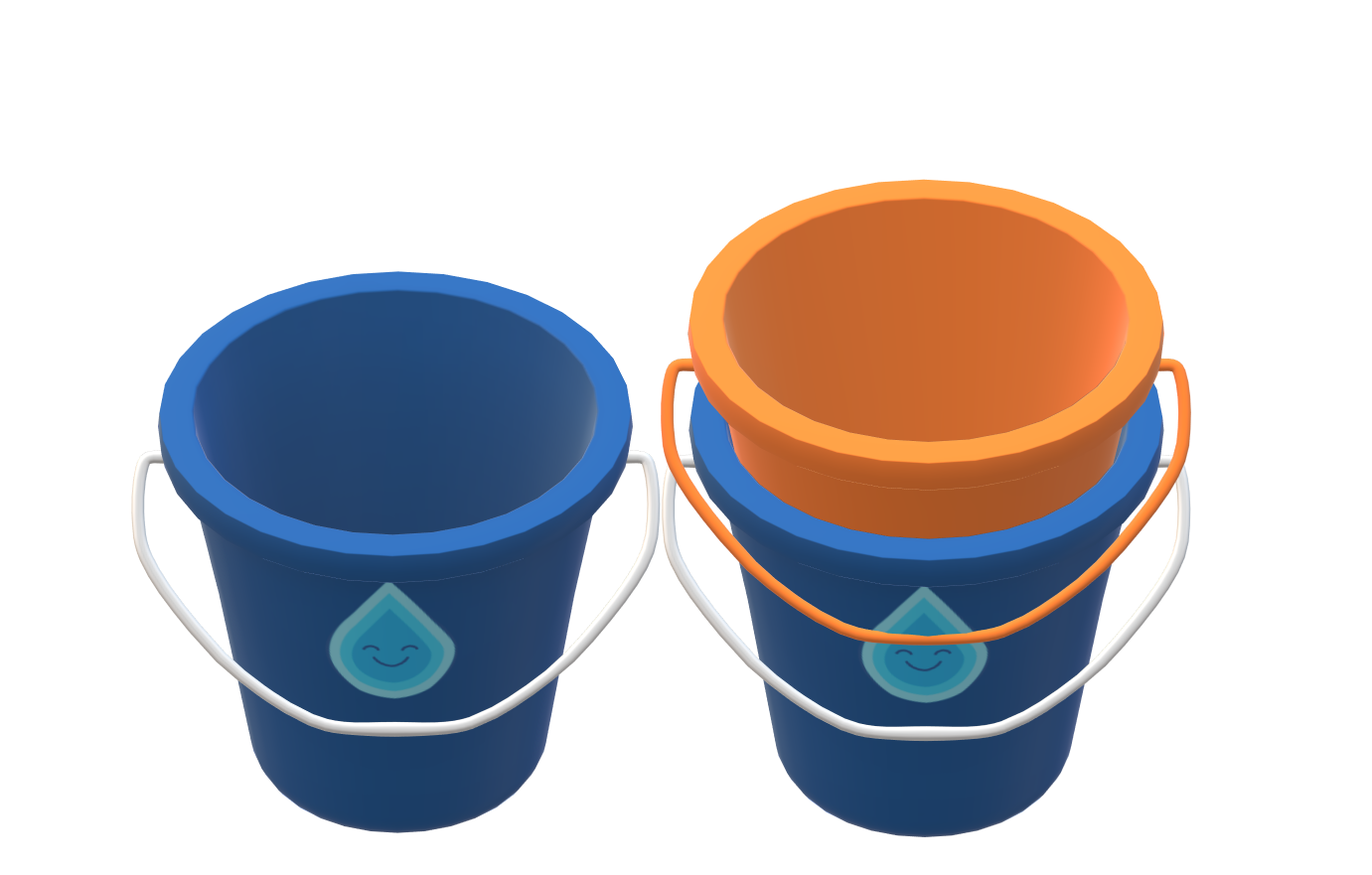 |
This property specifies how the product must be oriented when shipping. This is important for more delicate products being shipped. This property is a boolean property. When the OrientationLocked value is set to "true," the property will be locked on Dimension3, which is typically the height or vertical dimension, to keep the product in a defined position within the carton result.
 |
Below is an example of using the orientation property:
{
  "identifiers": {
    "upc": "12345678"
  },
  "name": "Bread Basket",
  "orientationLocked": "true",
  "dimensions": {
    "length": 14,
    "width": 8,
    "height": 8
  }
}This property causes DIM to add additional padding to products. The dimensions of the product plus the padding will show in the paddedDimensions field.
The following examples display how the variables look in the response depending on the padding requirements.
PackNet Cube uses the paddedDimensions field as it calculates the dimensions of the product with the padding.
Item Does Not Require Padding
{
  "requiresPadding": false,
  "useDefaultPadding": false,
  "padding": 10,
  "dimensions": {
    "length": 10,
    "width": 10,
    "height": 10
  },
  "paddedDimensions": {
    "length": 10,
    "width": 10,
    "height": 10
  }
}
Requires Padding - Does Not Use Default Padding
{
  "requiresPadding": true,
  "useDefaultPadding": false,
  "padding": 10,
  "dimensions": {
    "length": 10,
    "width": 10,
    "height": 10
  },
  "paddedDimensions": {
    "length": 20,
    "width": 20,
    "height": 20
  }
}
Requires Padding - Uses Default Padding
{
  "requiresPadding": true,
  "useDefaultPadding": true,
  "padding": 20,
  "dimensions": {
    "length": 10,
    "width": 10,
    "height": 10
  },
  "paddedDimensions": {
    "length": 30,
    "width": 30,
    "height": 30
  }
}This property determines when products are allowed to be layered with other products or not. The layer restrictions are handled at the product level and uses the isSingleLayer property. When isSingleLayer is enabled for a product, the algorithm will avoid placement of additional products on top or underneath the specified product.
For layering to be allowed, the property should be: isSingleLayer: true
Below is an example of a single layering property request:
{
  "orderId": "TEST_ORDER",
  "items": [
    {
      "sku": "ProductA",
      "dimension1": 10,
      "dimension2": 20,
      "dimension3": 30,
      "weight": 5,
      "quantity": 6,
      "canNest": false,
      "isSingleLayer": true,
      "OrientationLocked": false,
    }
  ],
  "containerOptions": {
    "minimumDimension1": 1,
    "maximumDimension1": 20,
    "incrementDimension1By": 1,
    "minimumDimension2": 2,
    "maximumDimension2": 40,
    "incrementDimension2By": 1,
    "minimumDimension3": 3,
    "maximumDimension3": 60,
    "incrementDimension3By": 1,
    "maximumWeight": 100
  },
  "SelectionOptions": {
    "OrderBy": "distance",
    "CutoffTime": 1200000,
    "Shrinkwrap": true,
    "MaxCartons": 0
  },
  "limit": 1,
  "maxCartons": 10
}
Below is an example of a single layering property response:
{
    "containerId": 9636,
    "timeoutReached": false,
    "orderId": "TEST_ORDER",
    "packagingResult": {
      "isCompletePack": true,
      "packedItems": [
        {
          "id": 0,
          "isPacked": true,
          "dimension1": 10,
          "dimension2": 20,
          "dimension3": 30,
          "coordinateX": 0,
          "coordinateY": 0,
          "coordinateZ": 0,
          "quantity": 1,
          "packedDimensionX": 20,
          "packedDimensionY": 10,
          "packedDimensionZ": 30,
          "volume": 6000,
          "canNest": false,
          "orientationLocked": false,
          "isSingleLayer": true,
          "nestGrowthDimension1": 0,
          "nestGrowthDimension2": 0,
          "nestGrowthDimension3": 0,
          "nestMaxDimension1": 0,
          "nestMaxDimension2": 0,
          "nestMaxDimension3": 0,
          "canContain": false,
          "containDimension1": 0,
          "containDimension2": 0,
          "containDimension3": 0,
          "sku": "ProductA",
          "voidContents": null,
          "nestedQuantity": 0,
          "weight": 5
        },
        {
          "id": 0,
          "isPacked": true,
          "dimension1": 10,
          "dimension2": 20,
          "dimension3": 30,
          "coordinateX": 0,
          "coordinateY": 0,
          "coordinateZ": 30,
          "quantity": 1,
          "packedDimensionX": 30,
          "packedDimensionY": 20,
          "packedDimensionZ": 10,
          "volume": 6000,
          "canNest": false,
          "orientationLocked": false,
          "isSingleLayer": true,
          "nestGrowthDimension1": 0,
          "nestGrowthDimension2": 0,
          "nestGrowthDimension3": 0,
          "nestMaxDimension1": 0,
          "nestMaxDimension2": 0,
          "nestMaxDimension3": 0,
          "canContain": false,
          "containDimension1": 0,
          "containDimension2": 0,
          "containDimension3": 0,
          "sku": "ProductA",
          "voidContents": null,
          "nestedQuantity": 0,
          "weight": 5
        },
        {
          "id": 0,
          "isPacked": true,
          "dimension1": 10,
          "dimension2": 20,
          "dimension3": 30,
          "coordinateX": 20,
          "coordinateY": 0,
          "coordinateZ": 0,
          "quantity": 1,
          "packedDimensionX": 10,
          "packedDimensionY": 20,
          "packedDimensionZ": 30,
          "volume": 6000,
          "canNest": false,
          "orientationLocked": false,
          "isSingleLayer": true,
          "nestGrowthDimension1": 0,
          "nestGrowthDimension2": 0,
          "nestGrowthDimension3": 0,
          "nestMaxDimension1": 0,
          "nestMaxDimension2": 0,
          "nestMaxDimension3": 0,
          "canContain": false,
          "containDimension1": 0,
          "containDimension2": 0,
          "containDimension3": 0,
          "sku": "ProductA",
          "voidContents": null,
          "nestedQuantity": 0,
          "weight": 5
        },
        {
          "id": 0,
          "isPacked": true,
          "dimension1": 10,
          "dimension2": 20,
          "dimension3": 30,
          "coordinateX": 30,
          "coordinateY": 0,
          "coordinateZ": 0,
          "quantity": 1,
          "packedDimensionX": 20,
          "packedDimensionY": 10,
          "packedDimensionZ": 30,
          "volume": 6000,
          "canNest": false,
          "orientationLocked": false,
          "isSingleLayer": true,
          "nestGrowthDimension1": 0,
          "nestGrowthDimension2": 0,
          "nestGrowthDimension3": 0,
          "nestMaxDimension1": 0,
          "nestMaxDimension2": 0,
          "nestMaxDimension3": 0,
          "canContain": false,
          "containDimension1": 0,
          "containDimension2": 0,
          "containDimension3": 0,
          "sku": "ProductA",
          "voidContents": null,
          "nestedQuantity": 0,
          "weight": 5
        },
        {
          "id": 0,
          "isPacked": true,
          "dimension1": 10,
          "dimension2": 20,
          "dimension3": 30,
          "coordinateX": 30,
          "coordinateY": 0,
          "coordinateZ": 30,
          "quantity": 1,
          "packedDimensionX": 30,
          "packedDimensionY": 20,
          "packedDimensionZ": 10,
          "volume": 6000,
          "canNest": false,
          "orientationLocked": false,
          "isSingleLayer": true,
          "nestGrowthDimension1": 0,
          "nestGrowthDimension2": 0,
          "nestGrowthDimension3": 0,
          "nestMaxDimension1": 0,
          "nestMaxDimension2": 0,
          "nestMaxDimension3": 0,
          "canContain": false,
          "containDimension1": 0,
          "containDimension2": 0,
          "containDimension3": 0,
          "sku": "ProductA",
          "voidContents": null,
          "nestedQuantity": 0,
          "weight": 5
        },
        {
          "id": 0,
          "isPacked": true,
          "dimension1": 10,
          "dimension2": 20,
          "dimension3": 30,
          "coordinateX": 50,
          "coordinateY": 0,
          "coordinateZ": 0,
          "quantity": 1,
          "packedDimensionX": 10,
          "packedDimensionY": 20,
          "packedDimensionZ": 30,
          "volume": 6000,
          "canNest": false,
          "orientationLocked": false,
          "isSingleLayer": true,
          "nestGrowthDimension1": 0,
          "nestGrowthDimension2": 0,
          "nestGrowthDimension3": 0,
          "nestMaxDimension1": 0,
          "nestMaxDimension2": 0,
          "nestMaxDimension3": 0,
          "canContain": false,
          "containDimension1": 0,
          "containDimension2": 0,
          "containDimension3": 0,
          "sku": "ProductA",
          "voidContents": null,
          "nestedQuantity": 0,
          "weight": 5
        }
      ],
      "packTimeInMilliseconds": 0,
      "percentContainerVolumePacked": 75,
      "percentItemVolumePacked": 100,
      "unpackedItems": [],
      "packedItemsCount": 6,
      "packedItemsWeight": 30
    },
    "container": {
      "id": 9636,
      "dimension1": 60,
      "dimension2": 20,
      "dimension3": 40,
      "volume": 48000,
      "ratio": 3,
      "surfaceArea": 8800,
      "distance": 74.8331477354788,
      "maximumWeight": 100
    },
    "solutionTimeMs": 956,
    "messages": [],
    "customFields": null
  }
]