Carton Property Groups
A Carton Property Group (CPG) is used to create a mix of cartons to make sure the process runs smoothly and efficiently. When CPG’s are used, Packsize machines will produce a mix of cartons based on the CPG ratios. These ratios are defined by an administrator within the production group settings, and can be set according to multiple properties like carton dimensions, pick zone, z-Fold quality, and classification.
Note
This feature is not utilized by the X7 machine platform.
CPG states can be set by the end user in the dashboard. See Carton Property Groups for more information.
Surge: These packages have the highest priority
Normal: These packages have a normal priority and will be produced after surged cartons
Stop: These packages will not be produced while in the stop state
Add a CPG
On the Carton Property Groups page, select Add New.
Enter the information as needed.
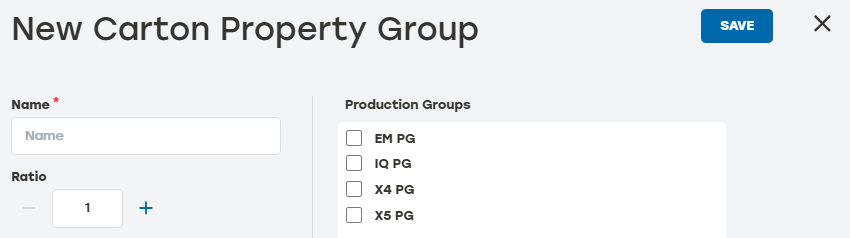
Name: The name of the CPG. This will be used to identify the CPG on the Dashboard
Ratio: When multiple CPGs are assigned to a production group, a mix ratio can be assigned (e.g., one carton produced from CPG1 for every four cartons of CPG2 produced)
Production Groups: Select production groups to apply to the CPG
Make sure that the new group is shown on the Carton Property Group page.
CPG History
Go to the Carton Property Groups page.
Select the history icon
 to the right of the desired CPG to review the data.
Date: The date the entry happened
Type: The type of item listed in the entry
Activity: A brief description of the action
User: The PackNet user who completed the action
Select the arrow icon
 for a detailed view of the activity.
Select anywhere outside the Carton Property Group History dialog to return to the Carton Property Groups page.
Edit a CPG
Go to the Carton Property Groups page.
Select the edit icon
 to the right of the CPG that needs to be edited.
Make changes as needed.
Select Save.
Delete a CPG
Go to the Carton Property Groups page.
Select the delete icon
 to the right of the CPG that needs to be deleted.
A dialog will appear asking to confirm deletion. Select Yes.
Make sure that the deleted CPG no longer appears on the Carton Property Groups page.