Mapping
Mapping explicitly links customer data to PackNet fields.
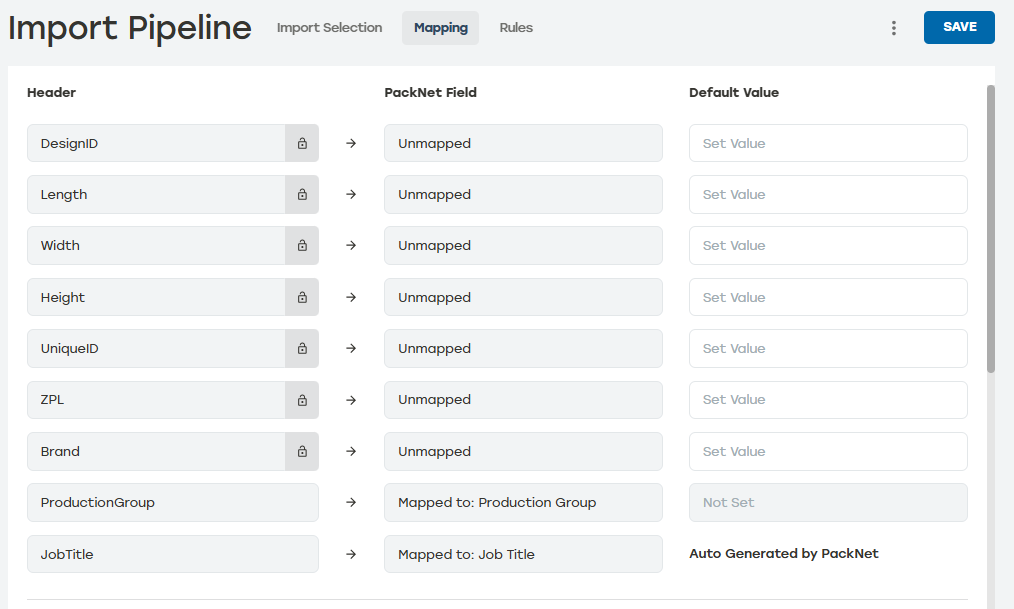 |
Header: Customer data identifiers defined in Import Selection. They are interchangeable, and headers can be used for any mapping or rule.
PackNet Field: Predefined objects that allow the system to process the specified data in an orderly and precise manner.
Default Value: When the customer header does not contain any data, a default value can be used instead. Default values can also be used in the creation of Rules even when they are not mapped.
All headers are automapped to a PackNet field when the name matches. Otherwise, a custom attribute of the same name will be created.
Custom attributes are not mappable to a PackNet field, but are settable at import time and can be used in Rules.
Import Pipeline uses three types of fields: Job Level, Carton Level, and Label Level.
Job Level fields: The values that apply to the job itself. These can be set by Mapping or within Rules. An example of a Job Level field is License Plate Number or Machine Group.
Carton Level fields: The values that apply to a carton. These can be set within Rules using Add Carton or Set Carton Value. An example of a Carton Level field is DesignID or Length.
Label Level fields: The values that apply to the label. These can be set within Rules using Add Label or Set Label Value. An example of a Label Level field is Template or Verification Code.
All these fields together are used to create the Packaging Solution.