Settings
Configuration settings enable a user to adjust certain DIM settings and select two additional identifiers that are used in the Scan to Produce workflow. What is selected is based on what information is available to be scanned. Enabling these fields on the configuration page will add new fields to the Scan to Produce tab. These fields typically serve as pass-through values and are utilized after the job is transferred to PackNet or to customer systems.
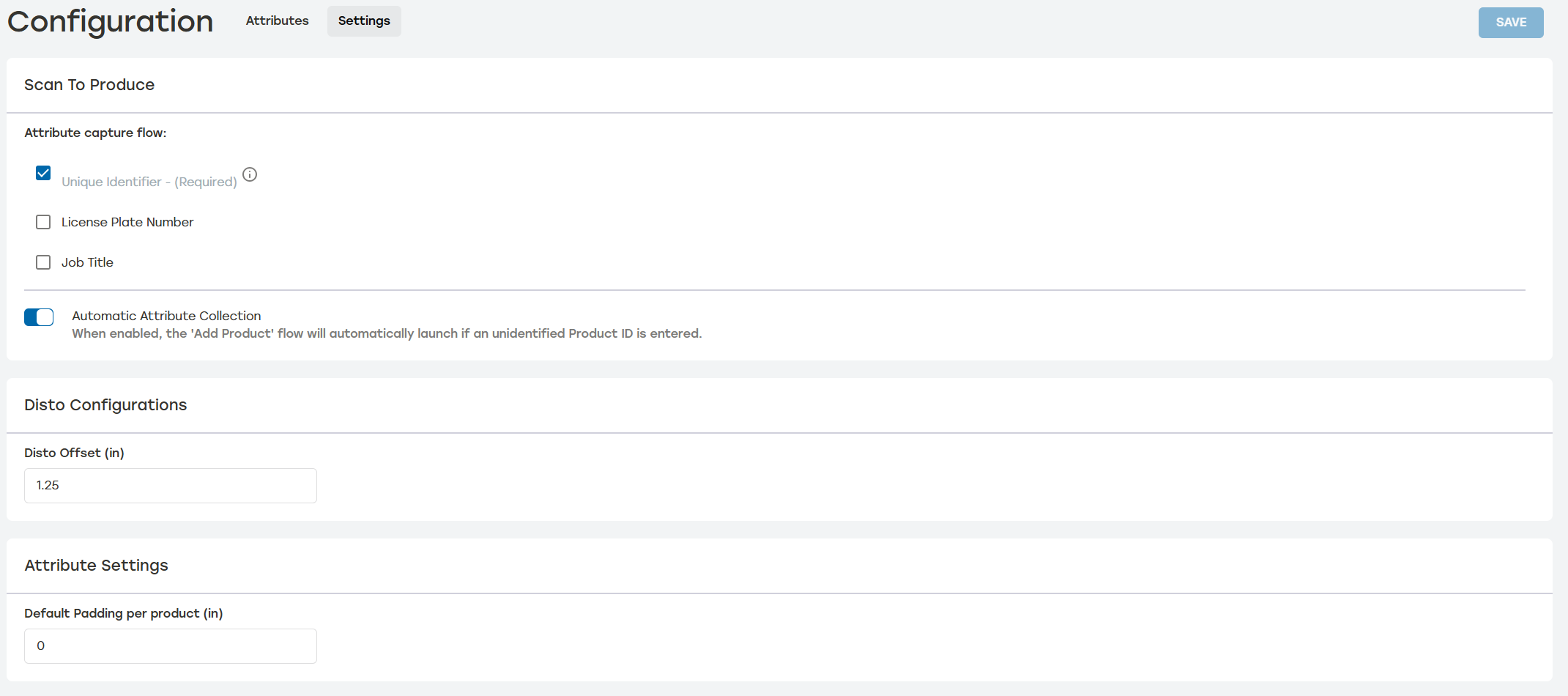 |
There are three options that can be selected.
Unique Identifier: This unique code or number is associated with a specific part or product, ensuring that PackNet DIM can accurately identify the correct record for each customer product. This is a required field.
License Plate Number: The License Plate Number is used to track the carton as it travels through a customer facility. It is typically printed on a label through PackNet and can associate a carton with a specific order.
Job Title: The Job Title field can be used to aggregate multiple cartons together for tracking and reporting purposes. This value may also be utilized when creating carton or shipping labels.
Selecting Automatic Attribute Collection allows the Add Product flow to launch when an unidentified product ID is entered. This makes it easier to capture missing product information.
Disto Configurations and Attribute Settings can also be set on this page. These settings are set to inches or millimeters based on how the customer tenant unit of measure is configured. Disto configuration establishes the offset value when a DISTO device with a bracket is used, allowing users to update the dimensions regardless of what bracket device is being used. Attribute settings allows users to establish a default padding amount that will be applied to every product.
Changes won't be applied until Save is selected. A green Saved notification will appear to the left of the Save button indicating the changes have been applied.