Rules
The Rules section is used to transform data and add deliverables (cartons, labels) according to configured conditions and actions. When a condition is met, a rule action is applied.
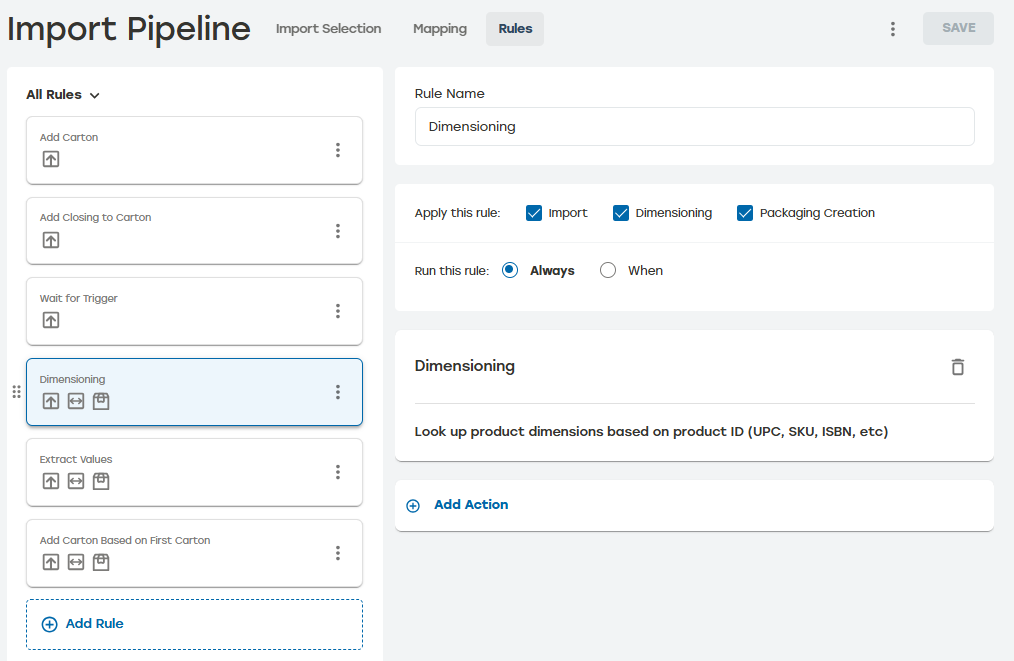 |
Import Pipeline can have an unlimited number of rules; each rule has set conditions and actions. Rules are evaluated in order. This mean that when the condition applies to a rule, the actions are executed in the order they appear in that rule.
Rules can be applied to Import, Dimensioning, and Packaging Creation pipelines or any combination of these options. At least one pipeline must be selected for the rule to be saved. Users must have access to PackNet DIM for the Dimensioning option to be available. Each rule will display icons indicating which pipelines apply to that rule. Rules can be filtered to show all rules, Import rules, Packaging Creation rules, and Dimensioning Rules.
Deliverables are not created implicitly. Rule actions must be used to add a carton or a label. Similarly, to edit a deliverable that has been created, use rule actions such as "Set Carton Value" or "Set Label Value."
The expressive power of rule actions and conditions should be able to produce the deliverables as desired for most customer scenarios. Work with the Packsize Product team for scenarios not covered with the existing implementation.