Closing Page Layout
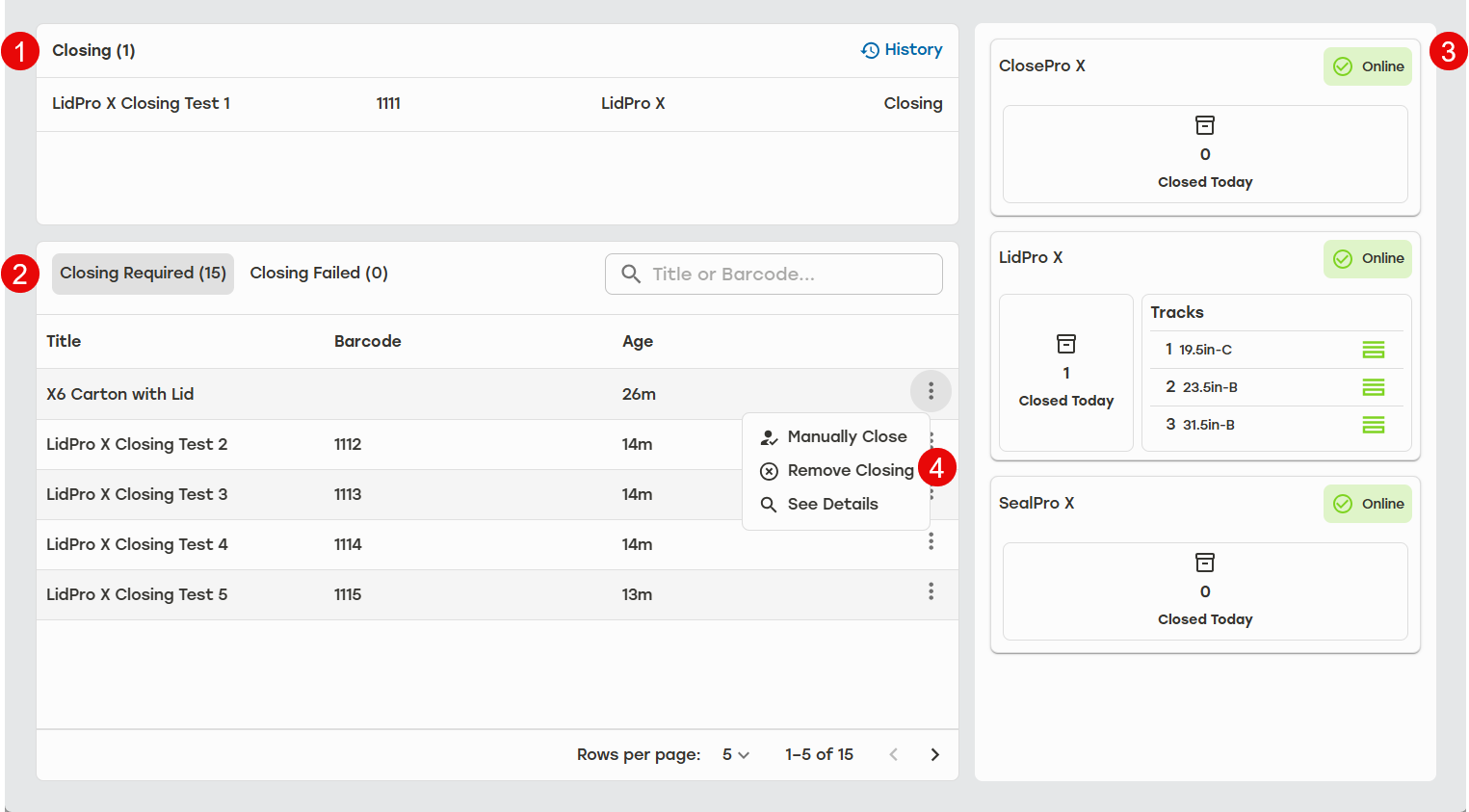 |
Closing - The active closing jobs appear at the top of the page. Users can also see a history of completed jobs by selecting History.
Closing Required/Failed - Users can toggle between the queue of cartons requiring closing and list of cartons that failed closing. The Closing Required tab displays all jobs that still need to be closed, sorted by carton creation date — with the oldest jobs at the top and the most recently produced ones at the bottom. Closing jobs are identified by job title, barcode, production date, and age.
The Failed tab will display any closing jobs that have failed to complete. These are identified by job title, barcode, failure reason, and age. Users can search for both upcoming and failed closing jobs by title or barcode. They can also adjust how may jobs appear in this section by selecting the rows per page.
Closing Machines - The right-hand column shows the closing machines configured in the tenant. Each closing machine will display the number of cartons that have been closed today, the corrugate loaded on the tracks, and the machine status.
Closing Options - Allows the user to select different options for each job. The options allows users to manually close the carton, remove the job from the closing list, and see job details.