DIM Import API Request Field Descriptions
DIM Import Products Request Parameters
Field | Data Type | Required | Description |
|---|---|---|---|
identifiers | Object | Yes | Numerical identifiers of the products |
name | String | No | Name of the product |
description | String | No | Description of the product |
weight | Number | No | Weight in the tenant’s default unit |
dimensions | Object | Yes | External dimensions of the product (length: number, width: number, height: number) |
requiresPadding | Boolean | No | Whether the target product requires additional space in the carton for extra padding (default value is false) |
useDefaultPadding | Boolean | No | Whether to use default padding is set in PackNet DIM UI (default value is false) |
padding | Number | No | Padding amount to be used for the target product |
paddedDimensions | Object | No | Calculated dimensions of the product plus additional padding described above |
canContain | Boolean | No | Whether the product can contain other items (default value is false) |
voidFill | Object | No | Dimensions of the void fill space of a canContain item |
canNest | Boolean | No | Whether the product can nest inside of another like item |
nesting | Object | No | Nesting details, incremental growth value of one item plus an additional item |
customAttributes | Object | No | Key-value pairs for custom product attributes |
orientationLocked | Boolean | No | When orientation needs to be fixed for the target product, locks on the height (vertical axis) (default value is false) |
quantity | Integer | No | Number contained in the target product |
isSingleLayer | Boolean | No | Designates when the target product can have other items placed above or below it (default value is false) |
productImage | String | No | URL to the product image |
supplier | String | No | Supplier name |
supplierNumber | String | No | Supplier identifier |
manufacturer | String | No | Manufacturer name |
comment | String | No | Additional comments |
Identifier Subfields
Identifier fields are largely optional, but at least one is required to be set as the unique identifier. For more information on setting a unique identifier, see the PackNet DIM User Manual [MANUAL-00041].
gtin
upc
ean
mpn
isbn
sku
itemNumber
gtin_8
gtin_12
gtin_13
gtin_14
isbn_10
isbn_13
{
    "identifiers": {
      "gtin": "84815178465165",
      "upc": "123654789147",
      "ean": "68451848",
      "mpn": "651651846165",
      "isbn": "16516515135165",
      "sku": "7770777",
      "itemNumber": "7770777",
      "gtin_8": "6515648651658",
      "gtin_12": "null",
      "gtin_13": "651815168156",
      "gtin_14": "18616548165",
      "isbn_10": "518516556816",
      "isbn_13": "65165168465168"
    },
Dimensions/voidFill/paddedDimensions Objects
External dimensions for the product/measurement of the voidFill space available inside the target product/dimensions of the product plus the padding amount.
Field | Data Type | Required | Description |
|---|---|---|---|
length | Number | Yes | Product length, typically the largest dimension |
width | Number | Yes | Product width |
height | Number | Yes | Product height, typically the vertical dimension |
   "dimensions": {
      "length": 12,
      "width": 12,
      "height": 7.5
}, "voidFill": {
"length": 11.75,
"width": 11.75,
"height": 7
}, "paddedDimensions": {
"length": 13,
"width": 13,
"height": 8.5
},canNest/nesting
Indicates whether a product can fit inside another identical product (e.g., bowls, chairs). For nesting items, provide the incremental increase in each dimension when adding one more item.
When one bowl is 6x6x4 and two stacked bowls are 6x6x6.5, the nesting attribute is 0x0x2.5 (difference in each dimension). nestMax is the maximum number of items that can be stacked together.
Field | Data Type | Required | Description |
|---|---|---|---|
canNest | Boolean | No | When the product can nest inside of another like item (default value is false) |
nestGrowthDimension1 | Number | No | Incremental increase of adding one item to Dim1 (typically length) |
nestGrowthDimension2 | Number | No | Incremental increase of adding one item to Dim2 (typically width) |
nestGrowthDimension3 | Number | No | Incremental increase of adding one item to Dim3 (typically height, most common increasing dimension) |
    "canNest": true,
    "nesting": {
      "nestGrowthDimension1": 0,
      "nestGrowthDimension2": 0,
      "nestGrowthDimension3": 1,
      "nestMax": 3
    },
customAttributes
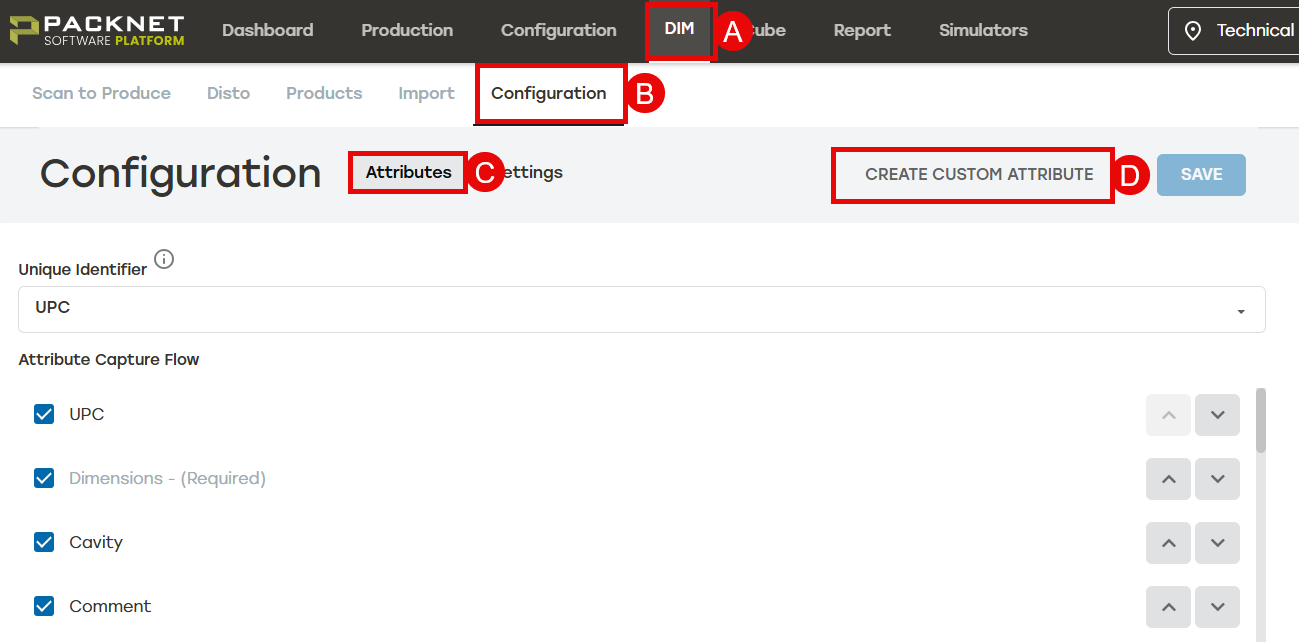
PackNet DIM is capable of using and accepting an unlimited number of custom attributes. These must be set first in the DIM UI at DIM > Configuration > Attributes > Create Custom Attribute before sending data to populate these fields.
 |
orientationLocked
This is a boolean value that will lock a product to not rotate on it’s vertical axis. Dimension ordering is important.
When a water bottle must not be shipped lying down, the dimensions must be entered in the following order: L = 3.5, W = 3.5, H = 6.5. When this product has the orientationLocked enabled, this product will be shipped with the 6.5 dimension always locked in the vertical axis.
Field | Data Type | Required | Description |
|---|---|---|---|
orientationLocked | Boolean | No | When orientation needs to be fixed for the target product, locks on the height (vertical axis) (default value is false) |
"orientationLocked": true,
isSingleLayer
This fields is intended for fragile products that must not have other products placed on top of or below the target product. When used, PackNet Cube will remove possible solution files where other items are above or below an isSingleLayer product.
Field | Data Type | Required | Description |
|---|---|---|---|
isSingleLayer | Boolean | No | Designates when the target product can have other items placed above or below it (default value is false) |
"isSingleLayer": false,